-
Flutter Singleton classFlutter/mobile 2020. 5. 13. 19:39
I tried to use Singleton in Flutter, but I was able to create a singleton class very simply.
In Flutter's language, Dart, class creation in general is not much different from any other programming language.
General class example
class Normal {
    Normal () {// constructor
        // Initialization code
    }
}
In the case of the singleton class, we can easily create a class using the factory keyword.
For reference, dart reserved words can be found at the link below.
https://dart.dev/guides/language/language-tour#keywords
[
A tour of the Dart language
A tour of all of the major Dart language features.
dart.dev
](https://dart.dev/guides/language/language-tour#keywords)
Singleton class example
class Singleton {
    static final Singleton _instance = Singleton._internal();

    factory Singleton() {
    return _instance;
    }

    Singleton._internal() { // occurs once when class is first created
    // Initialization code
    }
}
Now, let's check the difference between singleton and general class by creating two singleton and general class and increasing the count value.
class Singleton {
    int count; // variable to increase
    static final Singleton _instance = Singleton._internal();
    factory Singleton() {
        return _instance;
    }
    Singleton._internal() {
        // Initialization code
        count = 0;
        print('Singleton was created.');
    }
}

class Normal {
    int count; // variable to increase
    Normal() {
        // Initialization code
        count = 0;
        print('Normal class was create.');
    }
}

void main(List<String> arguments) {
    var nOne = Normal(); // Create the first generic class
    var nTwo = Normal(); // Create second generic class

    var one = Singleton(); // Create the first singleton class
    // Create a second singleton class
    //-Since the class has already been created, only the instance is passed.
    // Also, the initialization code is not executed.
    var two = Singleton();

    // Output count value of each first class
    print('singleton one: ${one.count}, two: ${two.count}');
    print('normal one: ${nOne.count}, two: ${nTwo.count}');

    // Increment count value of each class
    one.count++;
    two.count++;
    nOne.count++;
    nTwo.count++;
    print('##### Each class was updated.#################### ');
    // Once again, output the count value of each class
    print('singleton one: ${one.count}, two: ${two.count}');
    print('normal one: ${nOne.count}, two: ${nTwo.count}');

    // Check if class is the same instance
    print('is singleton class same: ${identical(one, two)}');
    print('is normal class same: ${identical(nOne, nTwo)}');
}
The execution result is as follows.
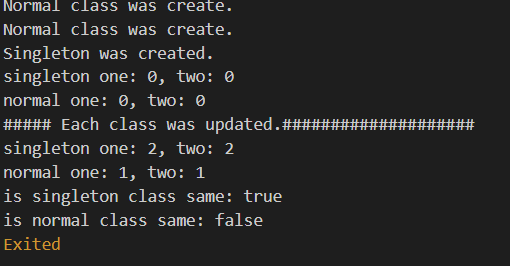
Normal class was create. Normal class was create. Singleton was created. <-You can see that the singleton entered the initialization code only once. singleton one: 0, two: 0 <-first count values normal one: 0, two: 0 ##### Each class was updated.#################### Since the V-singleton is a class of the same instance, the count is incremented by 1 each to become 2. singleton one: 2, two: 2 normal one: 1, two: 1 <-You can see that the normal class has increased by 1 each. is singleton class same: true <-You can see that a singleton is a class of the same instance (object). is normal class same: false'Flutter > mobile' 카테고리의 다른 글
Flutter App Screen Size (0) 2020.05.13 Flutter Back Button (0) 2020.05.13 Modifying the Flutter package-applied as an internal project (0) 2020.05.12 Modifying the Flutter package-with GitHub (0) 2020.05.12 Flutter QR Code Scan Simple example (0) 2020.05.12